Automate keystrokes with simple precision
Auto Key Clicker is a free, lightweight automation program that automatically simulates keyboard presses. It helps users complete repetitive typing tasks efficiently, saving both time and effort. Whether for gaming, data entry, or office automation, it provides a reliable and convenient solution for performing consistent, timed, and accurate keystrokes.
Top Recommended Alternative

With Auto Key Clicker, users can easily schedule specific keypress actions to repeat at chosen intervals, minimizing manual work and fatigue. Its intuitive interface and customizable options make it accessible for beginners yet practical for advanced users who need a dependable tool to automate repetitive computer activities smoothly and effectively.
Key features and functionality
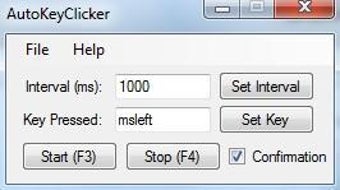
Auto Key Clicker features a simple interface that lets users assign any key to press automatically at chosen intervals. It allows full customization of keypress delays, making it useful for gaming macros or software testing. However, it’s limited to keyboard automation only, which can disappoint users needing broader functions. Despite this, its compact design ensures minimal CPU usage and smooth background operation.
The program includes features like adjustable hotkeys, single or multiple key automation, and interval control. Users can save settings for repeated use, reducing setup time. However, it lacks scripting or advanced customization options, limiting flexibility for power users. Its outdated design compared to newer tools also makes it feel less modern, though its portability and simplicity remain practical advantages for basic automation needs.
Alternatives include AutoHotkey, GS Auto Clicker, and TinyTask. These tools provide broader scripting features, mouse automation, and more complex customization options. However, this program stands out for its lightweight design, portability, and simplicity. It’s an ideal choice for users who prefer a straightforward, reliable keystroke automation tool without unnecessary complexity or the learning curve associated with more advanced automation software.
Simple, reliable, and efficient automation
Auto Key Clicker delivers dependable performance for users who need to automate repetitive keyboard actions. Its clean interface, efficient automation options, and low system impact make it ideal for both casual and frequent use. Although it lacks advanced scripting features found in other tools, its simplicity and stability make it a reliable option for quick, seamless, and hassle-free key automation tasks.